Three tools. One game.
Tagging happens at the bench, the numbers are calculated in the cloud, cutting and presenting happens on the Mac. All three work on the same data.
Live tagger
game day, at the bench
tags after the final whistle
Cockpit
cloud, in the browser
games, events, stats
Synadata Desktop
Mac, offline too
upload tags and video
Cockpit
Everything about the game in one place.
The cockpit is the web app for the whole coaching staff. Video, events and metrics sit in one view, and every number opens the matching scenes. This is where you review, analyse and present.
- Platform
- browser on Mac, PC and tablet
- Access
- login per club, roles for coaches and admins
- Data
- separated per club, export any time
Chances & possession
Shot control
Tap a metric for its explanation · Sample data
- Game report Overview, shots, players, zone entries, pressure, space, lines and discipline for every game.
- Video and review Confirm or reject detection suggestions and live tags, right on the video.
- Analysis My team, opponents, players and league: from the season to the next opponent.
- Similar scenes Find comparable plays to any scene across all your games.
- Presenting Clip lists for the team meeting, drawing on the running video.
- Game report and sharing PDF report in one click, share links for playlists and shifts without login.
Live tagger
The events are in before the team reaches the locker room.
During the game, someone at the bench taps on a phone or tablet where the shot came from. The tool calculates chance quality instantly. After the game the tags land in the right place in the video.
- Platform
- browser on phone or tablet
- Access
- enabled per club
- App
- Synadata Tagger for iPhone and iPad in beta
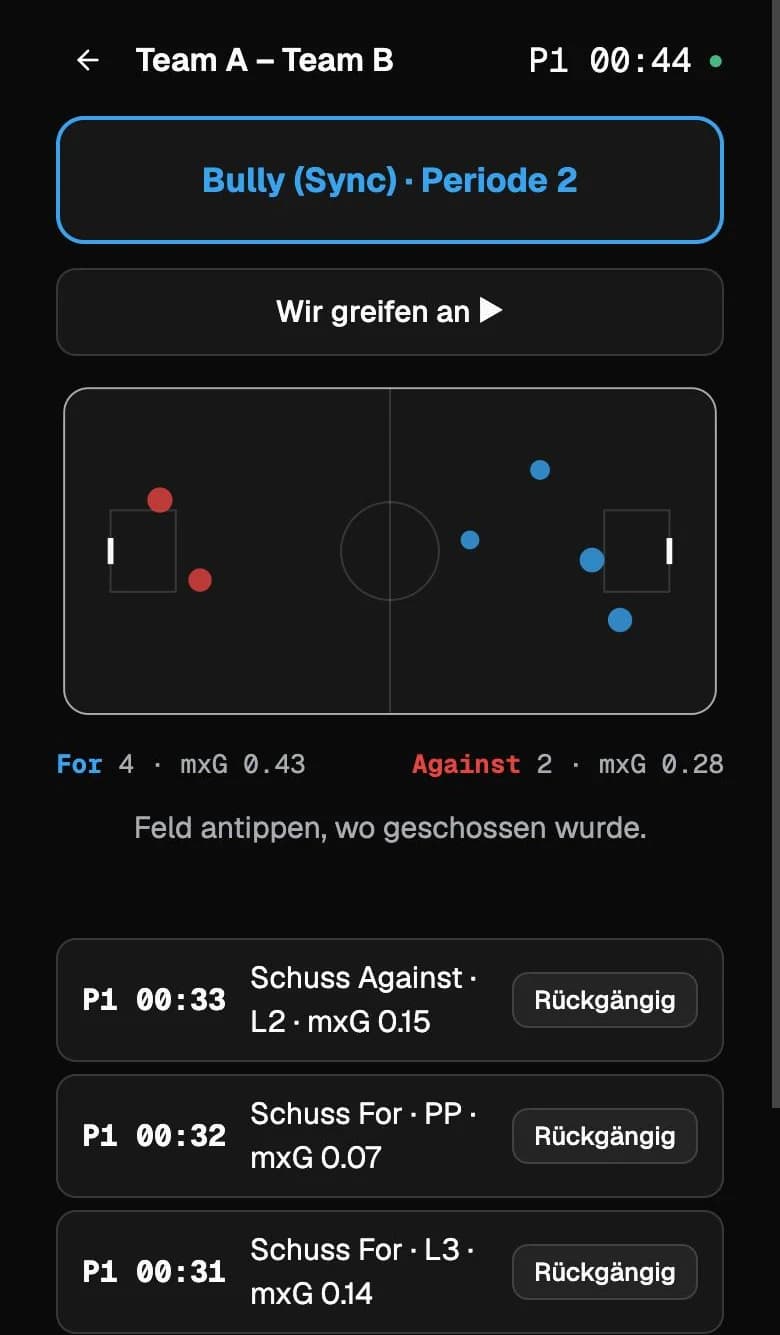
- Tap the rink Tap the shot location on the 40×20 rink, then choose team and line. Done.
- Live mxG Every shot gets its chance quality instantly, with running totals for both teams.
- Big buttons for the bench Goal, shot, turnover, zone entry, forecheck, pressing, counter, power play, box play, scene.
- Works without network With poor reception, tags stay on the device and are sent later, without duplicates.
- Several taggers More people at the bench join with a QR code, no account needed.
- Into the video One face-off tag per period anchors everything to the video. Shots snap to the detected attempts.
Synadata Desktop
Video analysis on the Mac. The way you know it, only connected.
The Mac app for everyone who cuts and presents video themselves. It works the way video analysts are used to and runs fully offline. If you want, you pull games, events and metrics from the cockpit.
- Platform
- macOS 15 or later, Apple Silicon and Intel
- Installation
- signed download notarised by Apple, with automatic updates
- Offline
- video and tags stay on the Mac, licence up to 30 days without network
- Code window and timeline Your own panels with buttons, hotkeys and groups, one row per category, floorball panels included.
- Matrix and browse Sort clips by category, search and filter across many games.
- Studio Presentations with chapters, drawing tools, presenter view on the projector and MP4 export.
- Up to four cameras Several angles in sync, with an assistant to align them at the face-off.
- Open formats Import and export tags as XML, export clips as a film.
- Connected to the cockpit Sign in with a code, open or stream games, load xG, shot map and line comparison, bring in live tags.
Which tool fits your club?
Tell us which league you play in and what video you have. We reply within two days.